Configurator

What is a Configurator?
Configurators optimize the sale of customized products.
Here’s an overview of their functionality:
Operational Insights:
The software allows sales teams to configure product options, generate accurate quotes, and handle complex pricing based on customer preferences.
Core Features:
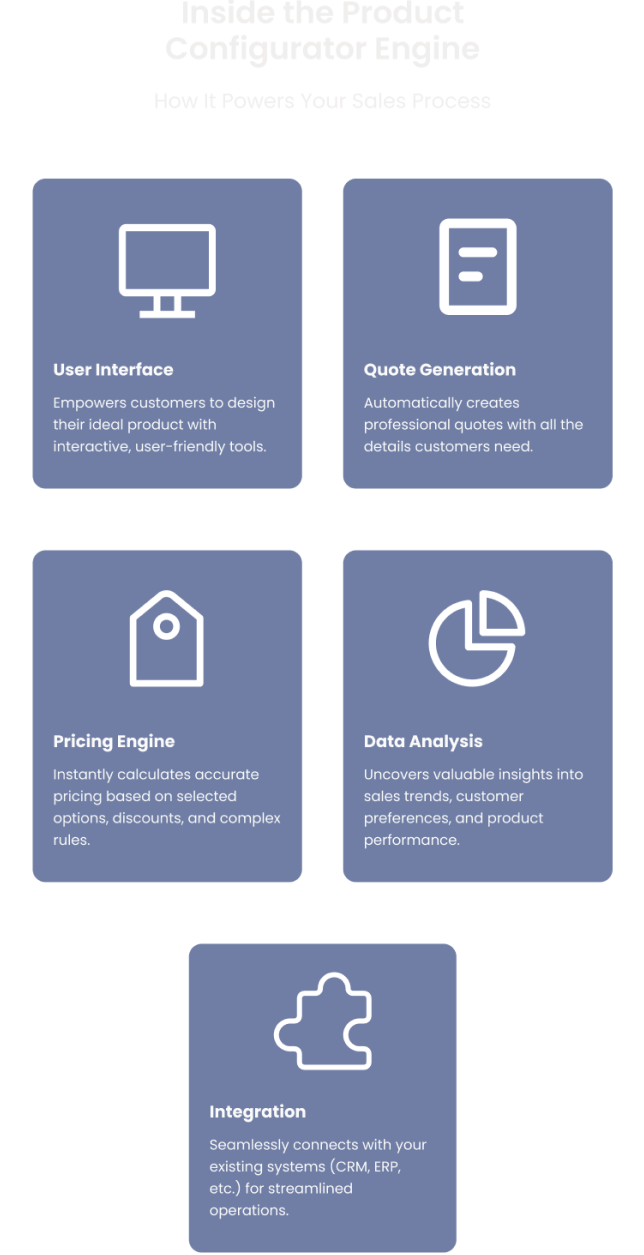
- Configurator: A user-friendly interface that enables customers to customize products to their needs.
- Pricing Engine: Handles complex pricing structures, including discounts and promotions.
- Quote Generation: Automatically generates precise and visual quotes.
- Data Analysis: Advanced analytics tools provide insights into customer preferences and sales patterns.
- Integration: Integration with CRM, ERP, and other systems ensures smooth data flow.
These features allow businesses to quickly respond to customer requests, reduce errors, and ensure a consistent sales process.
Companies using configurators experience:
- A 60% increase in conversion rates for quotes
- A 75% reduction in the time it takes to generate quotes
- An 80% reduction in errors in the sales process
Benefits of Implementing a Configurator
A configurator brings numerous benefits to the organization. Here are a few examples:
- For Sales Teams: Enables salespeople to quickly provide accurate quotes, improving response times and customer satisfaction.
- For Operations and Efficiency: Automates processes, reduces manual errors, and increases operational efficiency.

Automate the sales process with accurate pricing and quotes
Ensure error-free order handling and production

Scale your business to new markets
Applications for Configurators
Configurators can be adapted to various industries to enhance their sales processes.
- Automotive Industry: Allows customization of vehicle models with precise pricing, improving conversion rates.
- Furniture Industry: Enables customers to design furniture and visualize it with augmented reality, boosting purchase decisions.
- Manufacturing Industry: Simplifies the configuration of complex products and streamlines the quoting process.
Integrations
Integrating configurators with CRM, ERP, and CAD systems ensures a seamless data flow, improving the accuracy of quotes and production processes.
- CRM Integration: Synchronizing customer data ensures personalized quotes based on customer history.
- ERP Integration: Automates data from quote to order fulfillment, ensuring accuracy.
- CAD Integration: Ensures quotes are based on precise technical specifications for complex products.
- PIM Integration: Centralizes product information, ensuring sales teams always have access to the latest data.
Do you need a product configurator?
We empower manufacturers to master product modeling, streamline quoting process, reduce errors, and ultimately deliver the tailored solutions that customers demand.
Advanced Features
Configurators offer advanced features that handle complex sales processes and regulatory requirements.
- Quote Approval: Automates the approval process for faster response.
- Regulatory Compliance: Integrates requirements to ensure quotes always comply with regulations.
Choosing the Right Configurator Software
Choosing the right configurator software is crucial to align with your business goals and needs.
- Selection Criteria: Evaluate complexity, scalability, and integration options.
- Evaluating Providers: Compare solutions based on their features and support.
How to Implement a Configurator?
A successful configurator implementation requires planning and training to ensure full utilization of its features.
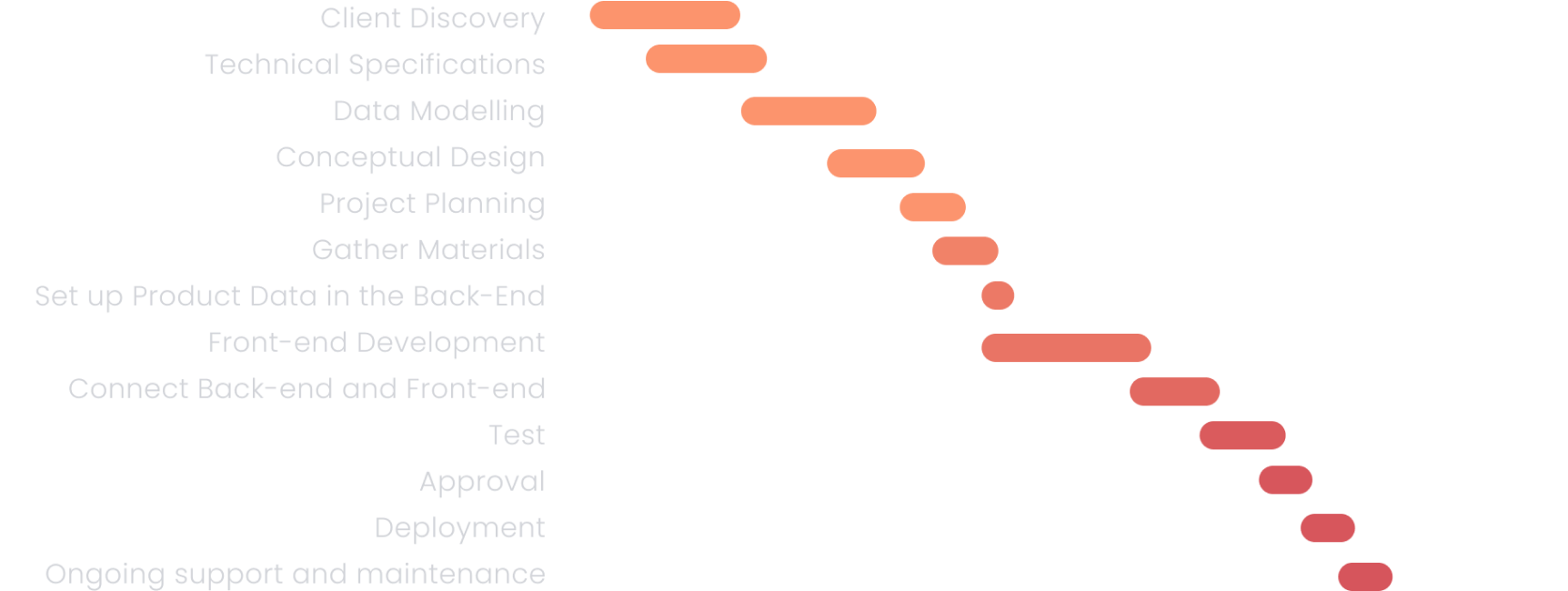
- Rollout: A phased implementation provides quick value.
- Training: Tailor training to different users for better understanding.
Future Trends
Integration of AI and Machine Learning will enhance customization and pricing based on customer behavior.
Expect wider adoption of augmented reality for product demonstrations and blockchain for secure contract management.
How a Configurator Works in Practice
Here is how a configurator operates in a real manufacturing environment — from the first customer interaction to a production-ready order.
- 1
Step 1: Product rules are modelled
Before a configurator can be used, the product logic is defined: which options exist, which combinations are valid, which options are required, and which are mutually exclusive. This is the product modelling phase — where complexity is encoded once so it can be applied consistently every time.
- 2
Step 2: User begins selecting options
A sales rep, engineer, or customer opens the configurator and starts making selections. With every choice, the system filters remaining options to show only what is compatible — no engineering knowledge required from the user.
- 3
Step 3: Configuration is validated automatically
When the user reaches the end of the selection flow, the configurator has already validated every choice against the product rules. The output is guaranteed to be a valid, buildable configuration.
- 4
Step 4: Output feeds downstream systems
The completed configuration passes to the next step in the workflow: a CPQ system for quoting, an ERP for production planning, or directly to manufacturing as a bill of materials (BOM). Clean, structured data flows downstream without re-keying.
Frequently Asked Questions about Configurators
- What is a configurator in software?
- A configurator is a software tool that guides users through selecting product options, enforcing rules that ensure only valid, manufacturable combinations can be chosen. It is used in sales, engineering, and manufacturing to replace manual configuration processes with structured, automated workflows.
- What types of configurators exist?
- The main types are: product configurators (customer-facing, used on websites), sales configurators (rep-facing, used during sales conversations), engineering configurators (used to generate BOMs and technical specs), and visual configurators (which include 2D or 3D rendering of the configured product).
- How does a configurator reduce sales errors?
- By enforcing product rules at the point of selection, a configurator prevents invalid combinations from being ordered. This eliminates the manual back-and-forth between sales and engineering that causes delays, rework, and margin loss on incorrectly quoted products.
- Is a configurator the same as CPQ?
- No. A configurator handles the product selection and validation step. CPQ (Configure, Price, Quote) is a broader system that includes the configurator plus pricing engines, approval workflows, and quote document generation. CPQ is built on top of a configurator.
- What is a visual configurator?
- A visual configurator displays a 2D or 3D image of the product that updates in real time as the user makes selections. Visual feedback dramatically increases buyer confidence and reduces returns. Companies using 3D visual configurators report up to 40% higher conversion rates.
- What is the difference between a configurator and a PIM system?
- A PIM (Product Information Management) system stores and manages product data — descriptions, attributes, and digital assets. A configurator uses that product data to enforce configuration rules and generate valid combinations. PIM is the data foundation; the configurator is the rule engine built on top of it.
Try our Configurator Demo Live
Let’s build together.
We empower manufacturers to master product modeling, streamline quoting process, reduce errors, and ultimately deliver the tailored solutions that customers demand.