ERP master data
Business Central
- Items
- Customers
- Pricing
- Inventory
- Manufacturing
Mercura + Microsoft Dynamics 365 Business Central
Configure complex products, calculate pricing, generate quotes and transfer approved configurations to Business Central.
Mercura adds configuration, pricing and quote automation to your Business Central sales process — without replacing Business Central as your ERP.
Sales Quote
When a manufacturing customer outgrows spreadsheet-based configuration or fragile Business Central customizations, Mercura can add CPQ without replacing the ERP footprint you already implement.
ERP master data
Configure · Price · Quote
Sales and manufacturing data
Business Central remains your core ERP system. Mercura adds the configuration layer required before a correct quote or order can be created.
Watch a real Mercura CPQ workflow connected with Microsoft Dynamics 365 Business Central.
See how configuration and sales data move from Mercura into the Business Central sales process without manually recreating the configuration in ERP.
Watch on YouTube if the embed does not load →
Guide the salesperson through valid product choices and configuration rules.
Calculate the commercial result and generate customer-ready sales documents from the same configuration.
Transfer the approved result into the agreed Business Central sales workflow.
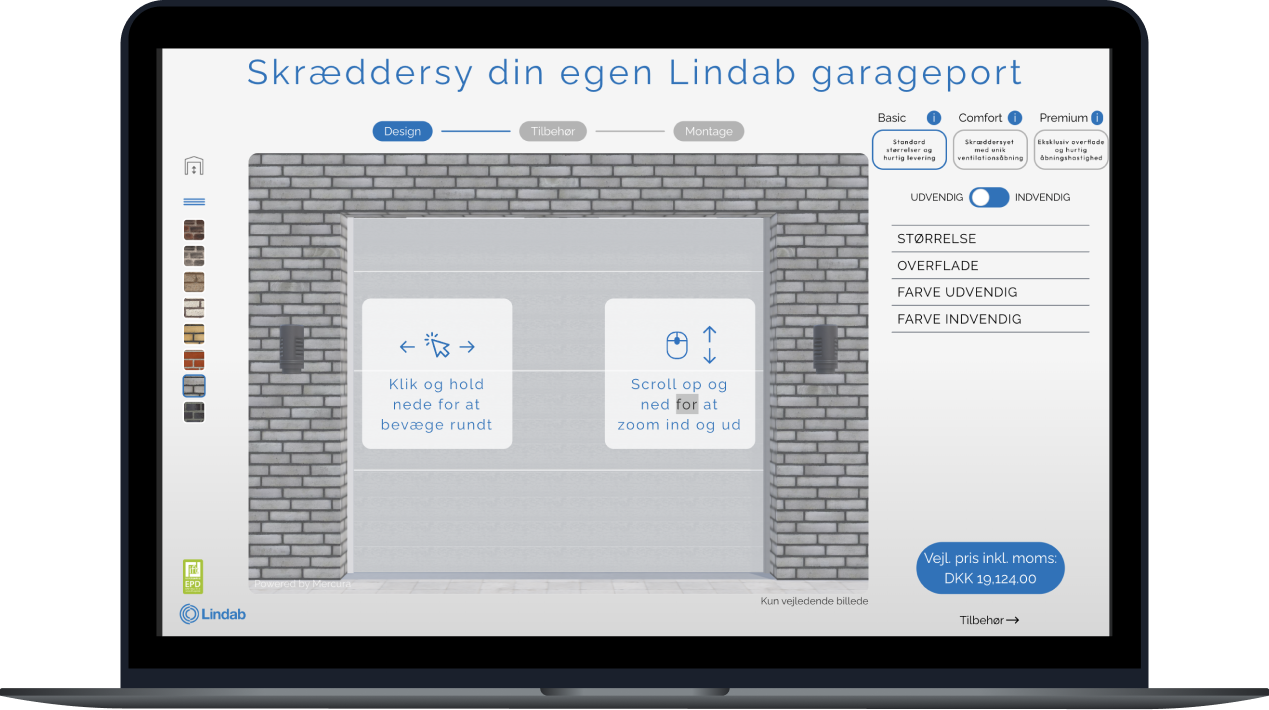
Airmaster uses a dedicated product configurator powered by Mercura. Customers can configure ventilation products through a branded frontend while product rules, calculations and quote logic run in Mercura.
Guided configuration
Only relevant and valid choices are presented.
Real-time rules & pricing
Configuration logic reacts as selections change.
Customer-facing experience
The interface can live on the web, in a portal or in another custom application.

The same structured configuration used to calculate the product can populate customer-ready quote documents — with configured items, article numbers, quantities, prices, descriptions and technical data.
The approved Mercura configuration can be mapped into Microsoft Dynamics 365 Business Central through standard APIs and custom AL APIs where company-specific data is required.
Technical reference
The integration is designed around your Business Central environment. A typical architecture may look like this:
| Data | Direction | BC integration | Purpose |
|---|---|---|---|
| Items | Business Central → Mercura | Standard API (Item) | Reuse ERP item master data |
| Customers | Business Central → Mercura | Standard API (Customer) | Customer-specific configuration and pricing |
| Units of measure | Business Central → Mercura | Standard API | Consistent product quantities |
| Standard prices | Business Central → Mercura | Standard API / price lists | Use ERP pricing as an input |
| Inventory information | Business Central → Mercura | Standard API | Display relevant availability where required |
| Configuration | Mercura → Business Central | Field mapping / custom API | Preserve configuration information |
| Quote lines | Mercura → Business Central | Standard API (Sales quote line) | Transfer configured quote lines |
| Sales quote | Mercura → Business Central | Standard API (Sales quote) | Continue quotation workflow in ERP |
| Sales order | Mercura → Business Central | Standard API (Sales order) | Transfer approved order information |
| Components/BOM data | Mercura → Business Central | Standard or custom API | Support configure-to-order manufacturing |
| Technical values | Mercura → Business Central | Custom API where required | Transfer configuration-specific attributes |
Manufacturing companies often extend Business Central with custom fields, AL extensions and company-specific tables. Mercura integrates with your environment — not a theoretical standard database.
During the technical analysis we identify which data is already available through Microsoft APIs, which requires a custom API, and exactly what should return to Business Central.
For Business Central Online, Microsoft supports service-to-service authentication for external applications using Microsoft Entra application identities — so integrations can use OAuth rather than employee accounts for unattended system-to-system communication.
Pricing can remain in Business Central, be split between Business Central and Mercura, or be calculated entirely in Mercura. There is no universal answer — the correct architecture depends on where your commercial logic lives today.
Business Central remains the pricing master. Mercura retrieves the relevant price and uses it during configuration.
Best when: Your ERP already produces the required prices and CPQ mainly solves product configuration.
Business Central provides basic item/customer pricing. Mercura calculates configuration-specific additions (base machine + width surcharge + material factor + motor upgrade + control package + accessories = configured price).
Best when: Standard items have established ERP pricing but options and dimensions introduce additional pricing logic.
Mercura owns the CPQ pricing model and transfers the resulting price to Business Central.
Best when: Pricing depends heavily on dimensions, formulas, product relationships, customer-specific logic, engineering values and configuration attributes.
For configure-to-order manufacturers, a correct quote is only the beginning. Production needs to know what to build.
Microsoft Business Central uses production BOMs to define components required for manufactured products and routings to define the operations required to produce them.
Mercura determines which existing Business Central product/BOM corresponds to the configuration.
Best suited when: The set of manufacturable variants is already represented in ERP.
A base item exists in Business Central. Mercura adds the configuration-specific information required to manufacture the customer's version.
Best suited when: You do not want a separate ERP item for every theoretical combination.
Mercura calculates which components and quantities are required from the customer's selections. The resulting structure is transferred into the agreed Business Central manufacturing flow.
Best suited when: The BOM genuinely changes based on the configuration.
Mercura determines the commercial configuration. Structured parameters are passed to engineering or CAD. The resulting technical data can then be used to create or update the final manufacturing structure in Business Central.
Best suited when: Every order still requires an engineering step, but CPQ can automate the repeatable portion of the process.
Technical reference
For Business Central architects, implementation partners and technical evaluators.
CPQ for Business Central connects the process of configuring, pricing and quoting complex products with Microsoft Dynamics 365 Business Central.
Business Central manages core ERP processes such as item master data, customers, sales documents, inventory, financials and manufacturing.
Mercura handles the complexity that happens before a correct order can be created:
The result is a sales process where the salesperson does not need to manually translate customer requirements into ERP data.
You probably do not need dedicated CPQ software if salespeople mainly select standard items, quantities and prices from an existing Business Central catalogue.
CPQ becomes valuable when creating the correct quote or order requires knowledge that cannot easily be represented as simple item selection.
Engineering dependency. Sales needs engineering to determine the correct product, options, components or dimensions for each customer requirement. Reusable product knowledge becomes configuration rules so repeatable engineering decisions happen automatically during sales.
Configuration complexity. Too many valid combinations exist for simple ERP item selection. Model the rules that define a valid product and calculate the correct commercial or manufacturing output from the selected configuration.
Complex pricing. Final price depends on dimensions, materials, components, customer agreements, margins and calculated values — often spread across ERP and spreadsheets. Business Central pricing can feed CPQ while configuration-specific logic is calculated during the sales process.
Manual quoting and visual selling. Quotes are assembled manually across Business Central, Excel, Word and email — while ERP item numbers give customers little visual context. Generate customer-ready quotations from the same structured configuration, with images, drawings or interactive 3D where it helps the sale.
A strong CPQ architecture does not duplicate an ERP. Each system should have a clearly defined responsibility.
There is no requirement that every implementation follows the same architecture. The correct design depends on where your product and commercial logic lives today.
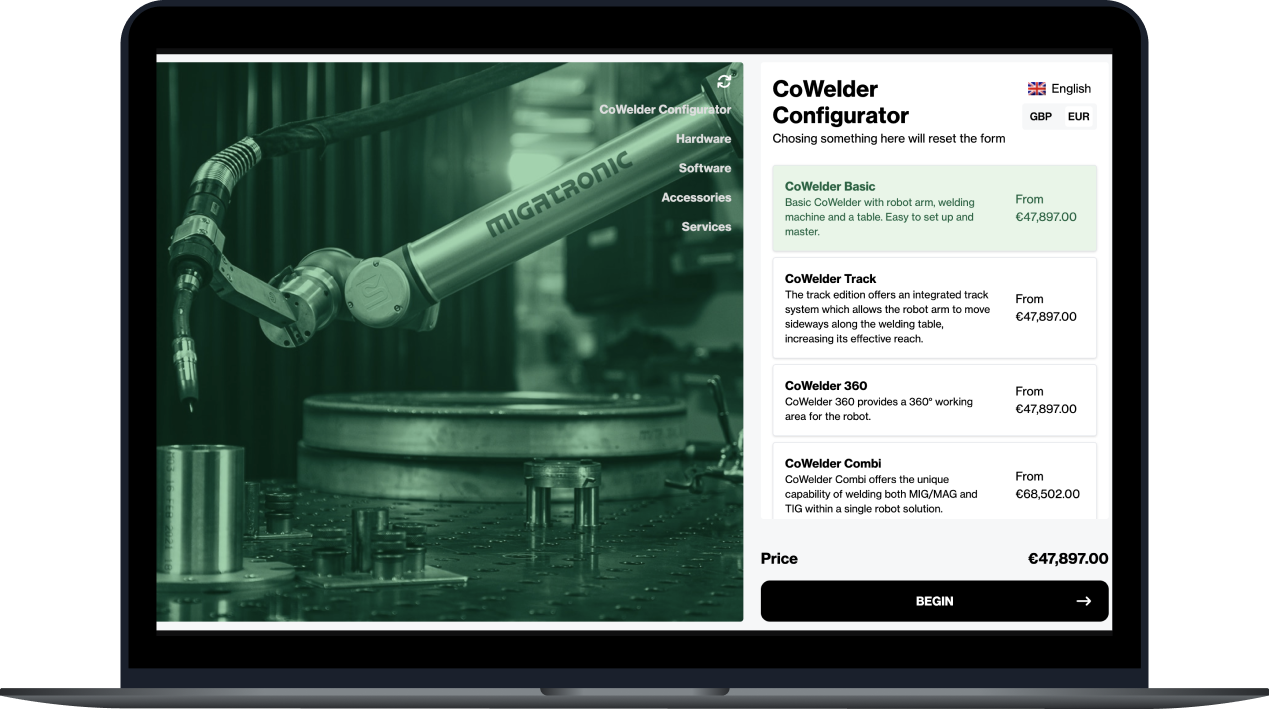
Example based on a real configurable welding robot implemented in Mercura (Migatronic CoWelder). The buyer selects from:
Configurator: Basic / Track / 360 / Combi
Hardware: Robot arm, welding machine, table system
Software: Sequence, MigaJob control, DUO Plus, Offset
Accessories: Wear parts, tooling packages
Services: Training and commissioning packages
Example rule logic based on the CoWelder configuration structure (Migatronic case study):
IF Combi is selected THEN both MIG/MAG and TIG welding paths become available.
IF a larger table system is selected THEN compatible robot reach options update.
IF Offset software is added THEN engineering and pricing adjust automatically.
The salesperson does not need to remember these relationships. The configurator does.
Commercial result: configured price, cost, margin, discount, descriptions, customer-facing specification.
Technical data: selected components, dimensions, option values, calculated quantities, configuration ID, BOM information, technical attributes.
The same structured configuration can populate prices, specifications, images, technical values, optional products and commercial terms into the required quotation template.
The agreed data is transferred into Business Central. Depending on the architecture, this could include sales quote, sales order, item lines, configuration reference, calculated dimensions, selected components and manufacturing data.
Configure once. Reuse the configuration throughout the process.
Select one real configurable product. Choose a representative product family. Provide product data, available options, configuration rules, pricing, an example quotation, Business Central item structure and expected ERP data.
Map the current process. Determine who configures the product today, what information they need, where pricing happens, where engineering becomes involved, what is entered into Business Central and what production ultimately needs.
Define system ownership. For every relevant piece of data, decide whether Business Central, Mercura or a calculated/shared model owns it — including items, customers, prices, costs, configuration attributes, components, documents and orders.
Define the API contract. Identify standard and custom Business Central endpoints, Mercura endpoints, authentication, data direction, sync behaviour and error handling.
Build the product model. Configure products, options, attributes, rules, constraints, formulas, pricing, documents and visualization.
Validate against historical orders. Take actual customer quotations that were previously created manually. Run the same requirements through Mercura and compare configuration, price, selected products, quantities, documents and Business Central output before automating.
Go live with a bounded scope. Start with one product family or sales workflow, then extend the same architecture after the integration and product model have been proven.
Not every object required by a manufacturer should be presented as a standard plug-and-play Business Central endpoint.
Custom fields, manufacturing structures, extensions and company-specific tables often require additional integration design. Where the required information is not available through Microsoft's standard APIs, Business Central supports building custom APIs in AL.
That is why Mercura integration projects begin with data mapping, not assumptions.
Experlogix, Insight Works and similar ERP-centric tools
Best when:
Best when:
If a simpler Business Central-native configurator is a better fit for your requirements, we would rather identify that during the initial analysis than implement unnecessary CPQ software.
CPQ for Business Central connects complex product configuration, pricing and quote creation with Microsoft Dynamics 365 Business Central. A CPQ platform guides the user through valid product configuration, calculates the commercial result and creates quotation data before sending the relevant information to Business Central.
Yes. Mercura can exchange data with Business Central through Business Central APIs. The exact integration depends on your Business Central data model, extensions, pricing setup and desired sales/manufacturing workflow.
No. Mercura is a CPQ platform. Business Central can continue to manage ERP processes including item master data, customers, sales documents, inventory, financials and manufacturing. Mercura handles the product configuration and commercial logic required before or during the creation of those transactions.
Yes. A common architecture is for Business Central to remain your ERP system of record for item data while Mercura maintains the configuration logic. The exact ownership is defined during implementation.
Yes. Business Central exposes item data through its REST API.
See Microsoft's Item API reference →Business Central exposes sales quote and sales quote line APIs. A Mercura configuration can be mapped into the relevant Business Central quote structure when this is the selected workflow.
See Microsoft's Sales Quote API reference →Yes. Business Central provides API operations for creating sales orders. The resulting Mercura configuration can be mapped to a Business Central sales order according to the agreed data model.
See Microsoft's Sales Order API documentation →Yes, but custom data requires explicit integration design. Microsoft's standard APIs expose predefined schemas. If information outside the standard API needs to be exposed, a custom API can be created in AL.
Read Microsoft's API documentation →Mercura can calculate the items, components and quantities required by a configuration. How that structure is transferred to Business Central depends on your manufacturing architecture — some implementations select existing BOMs, others generate configuration-specific structures, others pass parameters through engineering before the final manufacturing structure is created.
Yes. Business Central can own the final price, provide base prices to Mercura, or receive a configured price calculated by Mercura. The pricing architecture should have one clearly defined source of truth for each part of the calculation.
Yes. Mercura can provide configuration experiences for internal salespeople, dealers, distributors, customers and custom applications while synchronizing the resulting configuration with Business Central.
For Business Central Online, Microsoft supports service-to-service authentication for external applications using Microsoft Entra application identities.
See Microsoft's service-to-service authentication documentation →Yes. The integration can use Microsoft's Business Central Online API architecture.
The Business Central API connection is only one part of the project. Scope is usually driven by the number of configurable product families, product complexity, pricing complexity, document and visualization requirements, Business Central customizations and manufacturing output. Mercura scopes implementations around a real configurable product and quotation workflow rather than quoting a generic implementation duration.
Official Business Central resources
You do not need another generic CPQ presentation. Show us one real configurable product and how the corresponding quote or order is handled in Business Central today. We can then demonstrate how the same process could work with Mercura.
Request a CPQ demo